
IKPU codes from your company profile; VAT and totals are calculated
StartBitrix24 integration for businesses in Uzbekistan
Didox documents in your CRM
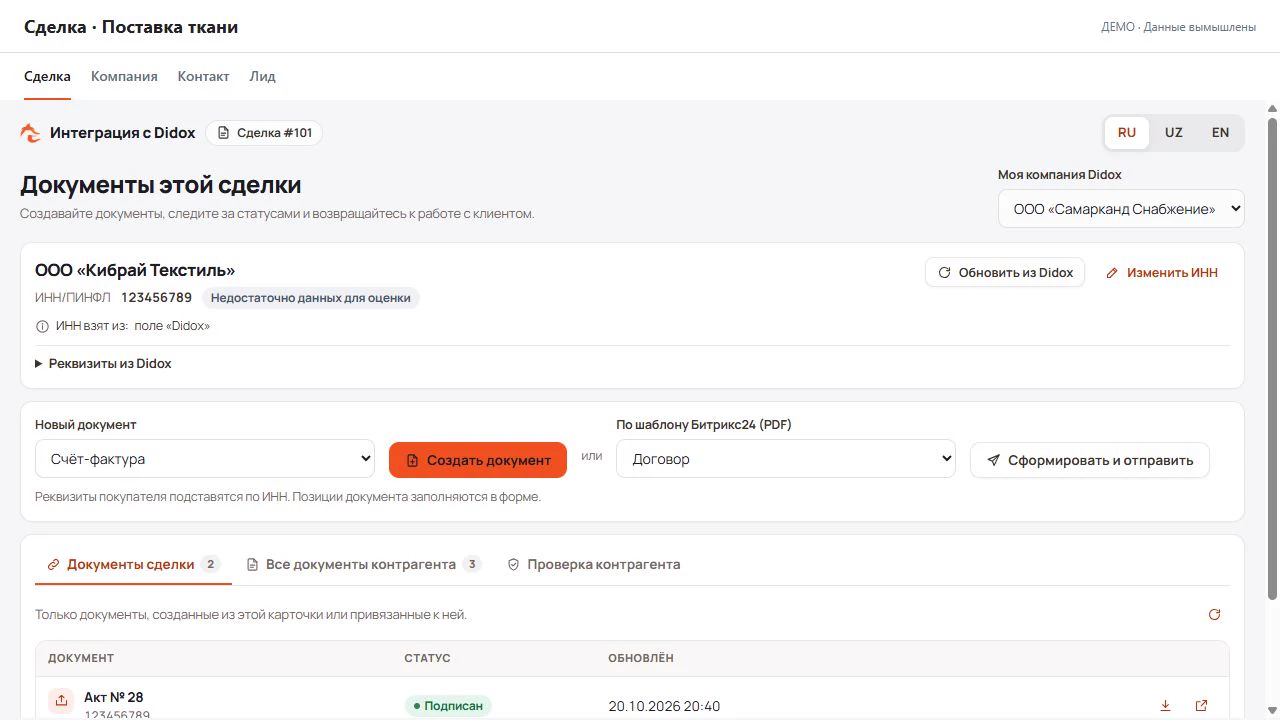
Create invoices and acts from a Bitrix24 record. The app loads buyer details by TIN, calculates VAT and shows document status in the deal.
Setup assistance included · No card required
- Details by TINThe app loads company details from Didox.
- Documents for each dealInvoices, acts and contracts linked to a sale.
- Status from DidoxSee which documents have been signed in the customer record.
Cloud and on-premise Bitrix24
 Watch the app overviewConnection, documents and settings
How it works
Working with a document
Open a deal
Open the Didox integration tab and check the buyer. Company details load using the TIN in the record.
Fill in the document
Choose the document type and IKPU codes, then enter quantities and prices. The app calculates VAT and totals.
Open the document to sign
Use the button in the deal to open and sign the document in Didox. The app checks document status every 5 minutes.
See the app before you install it
The overview shows the working screens and what to do at each step. Use the chapters to find what you need.
The workflow, from setup to documents
Demo · Fictional dataCompany connection, IKPU codes, CRM cards, document creation, registry, signing, templates and settings. The demo does not send or sign real documents.
Full walkthrough with English narration and captions. Short demos are silent. Open video separately · Walkthrough chapters (RU)
Connect your company with a password
A short guide to your login details, the connection form and checking the connection.
Connect your company with a password
A short guide to your login details, the connection form and checking the connection.
English narration and captions. The video uses fictional demo data.
Inside your CRM
Documents in the customer record
A deal shows the documents for that sale. Company and contact records show your exchange history with the counterparty.
Documents
What you can create from Bitrix24
Outgoing documents from a deal or a counterparty card. Incoming ones from partners — in the registry and the counterparty card.
Works and services: price, quantity, VAT
StartAs in the Didox cabinet: signatories, several partners, goods, content
StartNew format: director, chief accountant and agent by PINFL
ProShipping: cargo, addresses, transport
ProView incoming documents in the registry and the counterparty record. Open a document in Didox to accept or reject it.
All supported documents
For pharmaceuticals — the same strict roaming format
StartInvoice and waybill in one document: goods, transport, addresses
ProThe same for pharmaceuticals: batch, dispensing, markup
ProSite, lot, supervisor; work volumes and progress, VAT 12%
ProContract or payment invoice — a PDF from a template
StartTo receive goods from a supplier
ProOne PDF for two or more partners
ProCarrier, customer, shipper and consignee, trip ticket
ProBalance and transactions with a counterparty
ProFor a Didox company registered by PINFL: selling goods to a legal entity
ProFormatted text, signatory and attachments — as in the cabinet
ProParticipants with shares, chairman and secretary, content
ProUpdated e-invoice format supported
Invoice and pharma invoice forms support the Didox format dated 10 August 2026. The app highlights missing required fields before you save.
Features
What the app includes
Counterparty by TIN
Enter a TIN or PINFL — company, details, bank and director come from Didox. Searching by TIN keeps duplicates out.
Didox tab in the card
In leads, contacts, companies and deals — all of the counterparty’s documents, incoming and outgoing, with statuses.
CRM automation
A deal moves to the next stage by itself when a document is signed or rejected. Robots create a document from a template at the right stage; business processes wait for the signature and carry on. On the Professional plan.
BI reports
Didox documents and status history in the Bitrix24 BI Builder: how many documents were sent, signed and rejected — by company, type and deal. On the Professional plan.
Your company’s IKPU codes
Codes from the Didox profile plus classifier search; packaging comes from the code — no manual typing.
Document signing
Use the button in the record to open the document in Didox for signing. E‑IMZO signing inside Bitrix24 is not available yet.
Who signs
Portal administrators by default; you grant rights to other employees in “Access & signing”.
Three languages
The app speaks Russian, Uzbek and English; switch the language with one button inside the app.
Pricing
Per portal, per month
The first 14 days are free, with Professional features. No card needed: we send you an invoice.
Start
For one Didox company: core documents and company details in CRM.
135 500UZS / mo
- 1 Didox company
- Invoice (incl. Pharma), act, contract (Tax Committee), free-form PDF
- Open documents in Didox for signing
- Incoming and outgoing registry, statuses in CRM cards
- Counterparty by TIN: company, details, bank, director
- Company IKPU codes, document templates
- Access and signing rights
Professional
For several Didox companies and more document types.
200 000UZS / mo
Everything in Start, plus:
- Several Didox companies
- Power of attorney (old and new), waybill, reconciliation statement, multi-party document
- Counterparty information and risk signals
- Didox fields in every CRM entity
- CRM automation: triggers, robots and business processes
- BI reports in the Bitrix24 BI Builder
- Priority support
Payment and activation go through Vulpes Solutions: we send an invoice, and the plan is switched on for your portal once it is paid.
Prices are per Bitrix24 portal, in Uzbek sums (UZS). For 12 or 36 months, we show the average monthly price and the full term total. Discounts apply when the entire term is paid upfront.
The price covers the Didox–Bitrix24 integration. Didox services, your Bitrix24 plan and a Market subscription, if required for your portal, are paid separately.
Security
How data is stored
The E‑IMZO key stays on the computer
Signing happens locally; the server only receives the finished signature. We never see or store the private key.
Didox passwords are encrypted
Passwords and tokens are stored encrypted and never written to logs.
Portals are isolated
Each Bitrix24 portal’s data is kept apart: only your portal sees its documents and settings.
Public status page
Whether the service and its connection to Didox are up is visible on the status page at any time.
FAQ
Questions before you connect
Does it work with on-premise Bitrix24, or only cloud?
Both: the app works with on-premise and cloud Bitrix24.
What do I need to get connected?
You need Bitrix24 administrator access and your Didox company TIN and password. The installer adds tabs and fields. Contact us if you need help connecting.
Where is the E‑IMZO key stored?
On the employee’s computer. The signature is created locally through E‑IMZO and only the finished signature reaches the server — we never see or store the private key.
Which documents are supported?
Start includes invoices, pharma invoices, acts, contracts and PDF documents. Professional adds powers of attorney, waybills, reconciliation statements, multi-party documents and other forms. See the full list above.
What changed in the e-invoice format?
Since 10 August 2026 Didox accepts invoices only in the strict roaming format. The app assembles it on the server and shows errors next to the fields before sending.
Can I automate work with documents?
Yes, on the Professional plan and during the first 14 days. Triggers move a deal to a stage by the document status in Didox. Robots create a document from a template when the deal reaches a stage, and business process actions wait for the signature and continue the process. An employee signs the document with their E‑IMZO key. If the app was installed earlier, update it: “Market” → “Installed”.
How much is it, and is there a trial?
The first 14 days are free. After that, Start costs 135 500 UZS a month and Professional 200 000 UZS; paying for 12 months at once saves 10%, for 36 months 20%.
How are data and secrets stored?
Passwords and tokens are encrypted and kept out of logs, and data is isolated per portal. Details are in the privacy policy.
Get started
We’ll show it on your portal
Leave your contact details. We will help you install the app, connect your Didox company and prepare your first document. The trial lasts 14 days.
A Vulpes Solutions Technology product